LLAMA-Ai
AI Model : Using local model OLLAMA
- The information provided on this website is intended to provide a basic understanding of certain technologies and is not intended to be a comprehensive guide.
- Therefore, it should not be relied upon as the sole source of information and should not be used as a substitute for professional advice or expert analysis.
- Please exercise caution when visiting or downloading from websites mentioned on this website and verify the safety of the website and software.
- Some websites and software may be flagged as malware by antivirus programs.
- The reader assumes all responsibility for their use of the information contained on this website and any consequences that may arise.
- The author disclaims any liability for any damages or losses that may result from the use of this website or the information contained herein.
- The author reserves the right to update or change the information contained on this website at any time without prior notice.
- Any attempts to perform penetration testing or ethical hacking on systems or networks should be done with the explicit permission of the system/network owner.
- Unauthorized access is illegal and can result in serious legal consequences.
- It is important to fully understand the scope of the testing and to only test within that scope. Testing outside the agreed upon scope is considered unauthorized and may result in legal action.
- Any findings or vulnerabilities discovered during testing should be reported to the system/network owner immediately and kept confidential until a fix can be implemented.
- It is recommended to use a separate, dedicated testing environment rather than testing on a live production system to minimize the risk of accidentally causing damage or downtime.
- It is important to take steps to protect your own identity and prevent accidental data leaks or exposure of sensitive information during testing.
- It is also recommended to follow a standard code of ethics for ethical hacking and penetration testing.
Contents:
- YouTube: Extracting YouTube Transcript using Fabric framework.
- Summarizing : Generating summary, extracting insights from the transcripts, using fabric framework
- Fabric : fabric is an open-source framework for augmenting humans using AI.
- Downloading Installing Fabric Framework
- Installing missing files: from warning output.
- Installing OLLAMA AI model:
- Creating Short cuts for copy and paste:
- Running AI query to Extract YouTube transcript
- Saving YouTube transcript to File and generating AI queries
References:
- danielmiessler: https://github.com/danielmiessler/fabric
- Network Chuck: https://www.youtube.com/watch?v=UbDyjIIGaxQ&t=657s
************************************************************************************
Fabric Framework:
August 20, 2024 — We have migrated to Go, and the transition has been
pretty smooth! The biggest thing to know is that the previous installation
instructions in the various Fabric videos out there will no longer work
because they were for the legacy (Python) version.
https://github.com/danielmiessler/fabric
Downloading
Downloading go: https://go.dev/doc/install
- sudo tar -C /usr/local -xzf go1.23.0.linux-amd64.tar.gz
- export PATH=$PATH:/usr/local/go/bin
Installing Fabric Framework:
- go install github.com/danielmiessler/fabric@latest
-
Refreshing env path:
- sudo nano ~/.bashrc
- export GOROOT=/usr/local/go
- export GOPATH=$HOME/go
- export PATH=$GOPATH/bin:$GOROOT/bin:$HOME/.local/bin:$PATH:
Refreshing Window:
- source ~/.bashrc

|
| pipx install . |
Installing OLLAMA AI model:
- sudo apt install curl -y
- curl -fsSL https://ollama.com/install.sh | sh
 |
| Installing OLLAMA AI model: |
Starting the OLLAMA AI model:
- ollama run llama3
 |
| Starting the OLLAMA AI model: |
Starting OLLAMA in Windows: WSL
ollama serve
ollama run llama3
Fabric set up: adding API keys
- fabric --setup
- New Setup Guides
 |
| Setup |
 |
| Setting Ollama as default |
- fabric --list
- fabric --listmodels
Installing missing files: from warning output.
- sudo apt install ffmpeg
- source ~/.bashrc
Creating Short cuts for copy and paste:
- sudo nano ~/.bashrc
- alias pbcopy='xsel --input --clipboard'
- alias pbpaste='xsel --output --clipboard'
- source ~/.bashrc
Testing the command:
- eco "testing" | pbcopy
- pbpaste

|
| Short cuts for copy and paste: |
Windows: WSL : Creating Short cuts for copy and paste:
- sudo nano ~/.bashrc
- alias clip='powershell.exe -c clip.exe'
- alias past='powershell.exe -c Get-Clipboard'
- source ~/.bashrc
- echo "test" | clip
- past
Changing default model to LLAMA3
- fabric --changeDefaultModel llama3:latest
- source ~/.bashrc
- fabric --listmodels
Running AI query to Extract YouTube transcript
Installing yt - transcript:
- go install github.com/danielmiessler/yt@latest
Getting transcripts from youtube:
New way:
- fabric -y "https://www.youtube.com/watch?v=4TyfNtFGAC4&t=21s" -sp clean_text
- fabric -y "https://www.youtube.com/watch?v=4TyfNtFGAC4&t=21s" --stream --pattern clean_text
- OLD way
- yt --transcript https://www.youtube.com/watch?v=4TyfNtFGAC4&t=21s | fabric -sp summarize
- yt --transcript https://www.youtube.com/watch?v=4TyfNtFGAC4&t=21s | fabric -sp extract_insights

|
| Extract YouTube transcript |
Copying YouTube transcript to clipboard and generating AI queries
- yt https://www.youtube.com/watch?v=mmU7XZOVAdI | pbcopy
- pbpast | fabric -sp summarize

|
| Copying YouTube transcript to clipboard |
Saving Output to a file:
yt https://www.youtube.com/watch?v=mmU7XZOVAdI | fabric -o
isowebirnar.txt
Saving YouTube transcript to File and generating AI queries
cat imple271.txt | fabric -sp extract_recommendations
cat imple271.txt | fabric -sp summarize

|
| Saving YouTube transcript to File |
cat iso-transcript.txt | fabric -sp clean_text
yt --transcript https://www.youtube.com/watch?v=mmU7XZOVAdI | fabric -sp raw_query
**************************
fabric -sp clean_text:
Clean_text option Provides much more better transcript extract using fabric command.
yt --transcript https://www.youtube.com/watch?v=4B6_xQ7lxik | fabric -sp clean_text
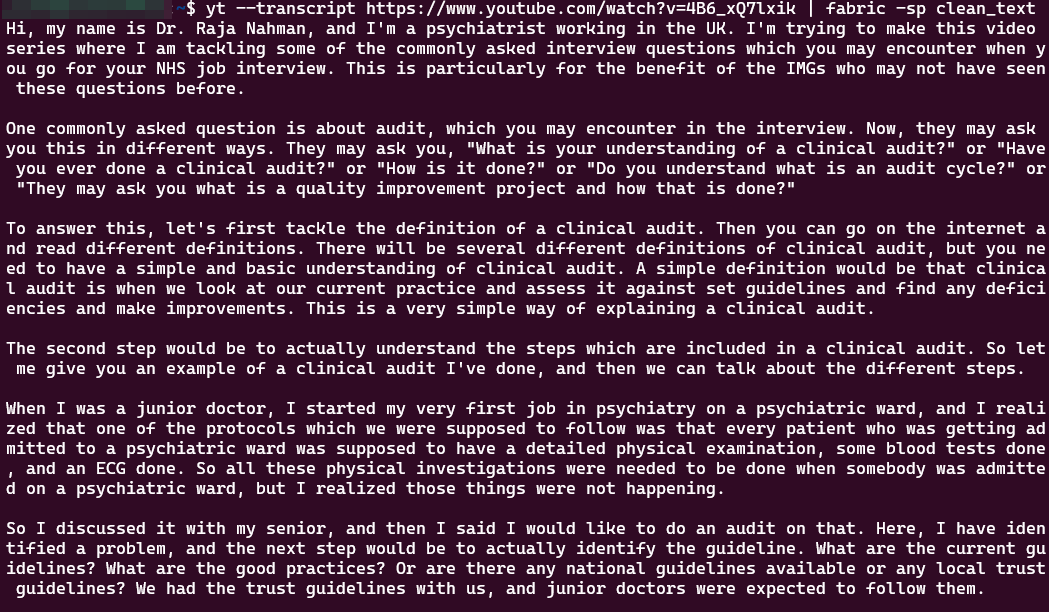 |
| fabric -sp clean_text |
**************************
TGPT
https://github.com/aandrew-me/tgpt
- tgpt is a cross-platform command-line interface (CLI) tool that allows you to use AI chatbot in your Terminal without requiring API keys.

Comments
Post a Comment