Posts

Invitation: wagamama birmingham brindley place @ Mon Feb 9, 2026 7am - 8am (GMT) (goutham1454.speech@blogger.com)

wagamama birmingham brindley place wagamama unit 15f, 113-115 waters edge Birmingham B1 2HL   wagamama unit 15f, 113-115 waters edge Birmingham B1 2HL When Monday Feb 9, 2026 ⋅ 7am – 8am (United Kingdom Time) Location Q-Park Brindleyplace, Brunswick St, Birmingham B1 2JF, UK View map Guests Goutham V - organizer vidhya.raam55@gmail.com goutham1454.speech@blogger.com View all guest info Reply for goutham1454.speech@blogger.com Yes No Maybe More options Invitation from Google Calendar You are receiving this email because you are an attendee on the event. Forwarding this invitation could allow any recipient to send a response to the organizer, be added to the guest list, invite others regardless of their own invitation status, or modify your RSVP. Learn more

Setting up VNC Server on Raspberry Pi Lite (Headless)

Image
2025: Setting up VNC Server with OMV on Bookworm- Raspberry Pi Lite (Headless)      After Several hours of trial and error method only "tightvncserver" works well with headless Pi image. More details info on :-  https://www.gouti1454.com/p/kali-linux-hands-on.html#2025:SettingupVNCServer sudo raspi-config Select the Interface and enable VNC Display option -> VNC resolution -> select highest value     Was trying  earlier with  "realvnc-vnc-server realvnc-vnc-viewer", which resulted in errors like:- could not connect to vnc server. please ensure that you have the required licence for this feature. vnc server cannot currently show the desktop. These are the commands, helped to achieve the barebone "lxde" desktop environment.  sudo apt install lxde-core tightvncserver sudo apt-get install  xfonts-base sudo apt install xserver-xorg-core sudo apt install xserver-xorg-video-fbdev sudo apt install xserver-xorg-input-evdev sudo apt install ...

Google: Book an Appointment Feature Rolled Out

Image
Google: Book an Appointment Feature Rolled Out Reference:  https://workspace.google.com/resources/appointment-scheduling/ Appointment scheduling allows you to manage your availability and let clients, partners, friends or family book time with you directly within Google Calendar via a personal booking page. https://workspace.google.com/intl/en_uk/products/calendar/ Google: Book an Appointment  Google has now made its "Book an Appointment" feature available to everyone. This tool lets you set your available time slots so others can schedule meetings with you without any calendar conflicts. It automatically checks your existing events to avoid overlaps. To get started, open Google Calendar, and you’ll find the option to create your first appointment schedule. Google Calendar: Create   Set your availability, customize the settings as per your needs.  Google Calendar: Create Once all the parameters are set based on your preferences, then click save.  Your personaliz...

Setting Up HomePage with Docker Compose

 Setting Up HomePage with Docker Compose Key things to get right, While installing  HomePage Docker:  ✅ Best Practices for Docker Compose: Use a .env file to securely store API keys, usernames, and passwords. Set the server name and ports under the HOMEPAGE_ALLOWED_HOSTS environment variable to avoid host validation errors. ✅ Widgets Configuration: For the Portainer widget, set the environment variable as "env: 2". ⚠ Common Errors & Fixes: 🔹 Error: HOMEPAGE_ALLOWED_HOSTS: Failed host validation  Fix: Ensure server name and ports are correctly set in HOMEPAGE_ALLOWED_HOSTS. 🔹 Error: End of the stream or a document separator is expected  Fix: This is a syntax error—check for extra characters in the file. 🔹 Error: Portainer API Error: Unable to find an environment with the specified identifier  Fix: Ensure correct variable names without mismatches. 🔹 Error: Portainer invalid JWT token Fix: Get the correct token from Portainer, stop the container, run d...

Upgrading Raspberry Pi OS Lite from bullseye to latest architecture bookworm and Setting Up Home Assistant on OMV

 Upgrading Raspberry Pi OS Lite from bullseye to latest architecture bookworm and Setting Up Home Assistant on OMV This guide covers upgrading Raspberry Pi OS Lite from Bullseye to Bookworm, installing OpenMediaVault (OMV), enabling Docker containers, and setting up Home Assistant. Finally, I’ll update Raspberry Pi Connect - Lite for remote SSH access. Contents: ✅ Enabling Docker Compose on OMV7 and Setting Up Containers 🔹 Step 01: Enabling Docker repository 🔹 Step 02: Installing OMV-Compose & plugins 🔹 Step 03: Creating a shared folder structure 🔹 Step 04: Creating a Docker Compose file to deploy containers Home Assistant on OMV Container Installing Home Assistant Container Adding Tapo Cameras Installing HACS Integration Remote Access with Raspberry Pi Connect - Lite Setting up SSH access for remote management This setup ensures a smooth transition to the latest Raspberry Pi OS while optimizing OMV for container-based applications like Home Assistant. Link:https://www.gout...

Multifactor authentication Updated for 2024

Table of Contents How to keep your Accounts safe Google: 2024 Multi-Factor Authentication: 2024: 2-Step Verification Settings 2024: Enhanced Browsing  2024 Dark web report Enable the Dark web report to get info on any data breaches. Facebook: Twitter: https://www.gouti1454.com/2017/05/enable-additional-security-layer-for.html

WhatsApp-Privacy-Advance-Settings

Image
 WhatsApp-Privacy-Advance-Settings Use the Privacy Settings to secure from spamming. Use Privacy check-up to make sure who are see your status, who are call you and more.   Block unknown Account messages: will help in getting any spamming messages.  Protect Ip address: Enable to protect from any snooping. 

Know-your-Mobile

  https://play.google.com/store/apps/details?id=com.app.cdot.KYM Developed by Centre for Development of Telematics (C-DOT), this app will verify any mobile by its IMEI number. KYM will provide status (Invalid/ Black Listed) or provide details like Manufacturer, Brand name and Model name of the given IMEI. While purchasing a mobile device, the genuineness of mobile devices can be verified using KYM App.

Science behind weight loss

  cholesterol01 https://www.youtube.com/watch?v=OLDQ4btyQAs cholesterol02 https://www.youtube.com/watch?v=jzzN5nxX7Wo&t=14s Cholesterol03 https://www.youtube.com/watch?v=z_wU_ou6z90 Cholesterol04 https://www.youtube.com/watch?v=Art3ztMEhsc&t=8s Weight loss01 https://www.youtube.com/watch?v=xDVLKcSBFEg weight loss02 https://www.youtube.com/watch?v=2A3kS4qzFJ0 weight loss03 https://www.youtube.com/watch?v=emKn1kQ2rpE weight loss04 https://www.youtube.com/watch?v=5l071pjm8y4

Privacy Settings for windows

Image
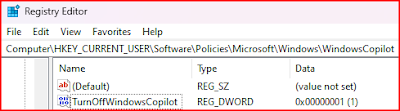
Privacy Settings for windows Read  DISCLAIMER  Go the link  https://www.gouti1454.com/p/privacy-settings-for-windows.html Turn Co-pilot Off: Disable Telemetry  Disable Search Box Suggestions Disable Few Task scheduler  Disable Few Services Disable Complete connectivity to microsoft service in host files Disabled all of the Microsoft tracking using a App turn co-pilot off

Next-DNS-Manager

Next-DNS-Manager Read  DISCLAIMER A complete Open source Manager which helps in keeping privacy, protecting from phishing. The Simple setup  Guide makes it more easier to use. Protect your phone using the Next-DNS Manager.  https://github.com/doubleangels/NextDNSManager Google Play Store: https://play.google.com/store/apps/details?id=com.doubleangels.nextdnsmanagement&pcampaignid=web_share

STEM career fair

  STEM career fair  Nov 2023 at NTU Campus https://nucleargraduates.com/event-registration/ https://www.sertec.co.uk/apprenticeships-overview/apprentice-vacancies/ https://qrco.de/bdm9MJ https://www.experian.com/careers/locations-teams/uk---ireland/uk-i-early-careers https://earlycareers.jcb.com/ https://ovarro.com/en/global/about-us/careers/opportunities/student-placement-programme---software-engineer/ https://www.jaguarlandrovercareers.com/content/Early-Careers/?locale=en_GB&utm_source=CampusCareerFair&utm_campaign=Graduate/Undergraduate%20Leaflets%202023 https://careers.fdmgroup.com/careersfair.aspx?source=UKNTU091123 https://careers.unilever.com/uk-placements https://jobs.bakkavor.com/content/Early-Careers/?locale=en_GB https://www.exclusive-networks.com/uk/about-exclusive-networks/careers/ https://forms.office.com/Pages/ResponsePage.aspx?id=joNvnQF5LkeO1dD4cGG2Vm9np5nkIdlNpZlTrtyDtMxUQlk1UDNKVVNPQ0JEU0xBNDgxUVM3T0I0Ni4u https://www.supplychain.nhs.uk/about-us/vaca...

Pi-Hole-Unbound-Perf.

Image
Pi-Hole and Unbound Performance Following the installation of Pi-Hole and Unbound for query blocking and ad tracking, let's dive into the performance statistics. Pi-Hole-Unbound-Performance Pi-Hole, serving as a standalone DNS server, has delivered excellent performance without any hiccups. However, the setup with Unbound as an upstream server introduced noticeable disruptions in communication between services and increased time delays. Consequently, we reverted to the OpenDNS configuration.  #DNS #PerformanceOptimization     Pi-Hole hands on: Contents: Configuring NAS (Network Attached Storage) on Raspberry Pi Install OMV - openMediaVault Install Plex Setting Up NordVPN Enable Firewall on NAS Installing Pi-hole How to Change DNS in Kali Linux Setting up VNC Server with OMV on Raspberry Pi Lite (Headless) How to connect from Kali to Raspberry- Pi using  VNC-viewer 

Kali/ Raspberry pi/ Pihole+Unbound/ OMV/Docker/ Portainer / VNC Virtual mode Along with OMV - Notes

 Kali/ Raspberry pi/ Pihole+Unbound/ OMV/Docker/ Portainer /  VNC Virtual mode Along with OMV  - Notes https://www.gouti1454.com/p/kali-linux-hands-on.html?m=1 This blog article covers: Kali Linux tools:  It explores the various tools available in Kali Linux, a popular operating system used for cybersecurity and penetration testing. Dual booting Kali Linux with Windows:  It provides a guide on how to install and set up Kali Linux alongside Windows, allowing users to choose between the two operating systems during startup. Building a NAS using Raspberry OS Lite:  It explains the process of creating a Network Attached Storage (NAS) system using Raspberry Pi with the lightweight Raspberry OS Lite operating system. Pihole + unbound It explains how you can set up network-wide ad blocking using your own Linux hardware. The Pi-hole is a DNS sinkhole that helps protect your devices from unwanted content, all without the need to install any software on individual de...

WhatsApp Channel rollout

Image
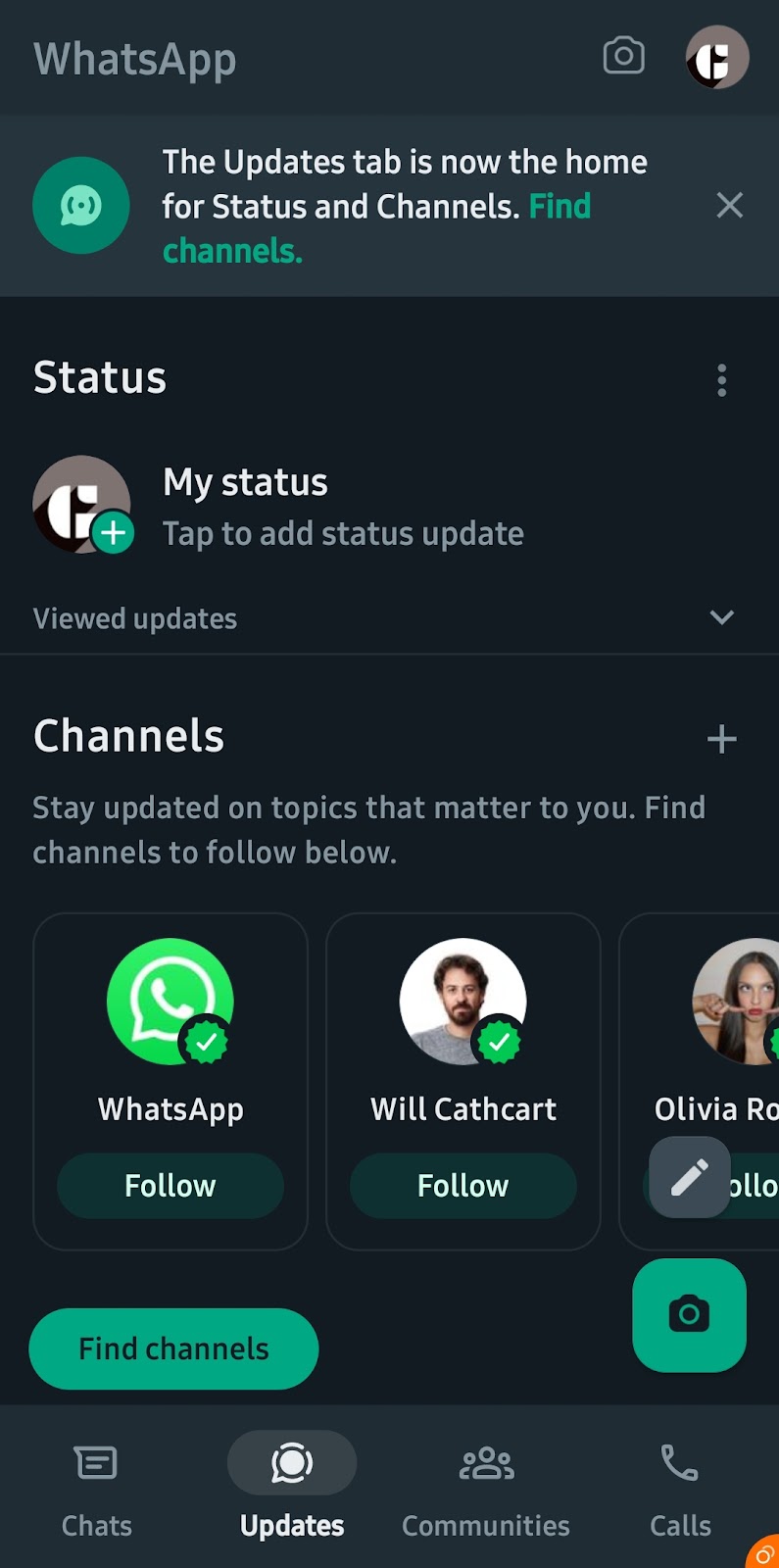
WhatsApp rolls out Channel - updates.

WhatsApp Add multiple accounts

Image
WhatsApp Add multiple accounts: WhatsApp has rolled out, to add multiple accounts on same app.  This feature is already available on telegram.

WhatsApp Desktop Emoji meanings

Image
 WhatsApp Desktop Emoji meanings In the desktop app, when you hover over the emoji icon, a tooltip appears, showing the meaning of that emoji. WhatsApp Desktop Emoji meanings

WhatsApp Community Privacy Update

Image
WhatsApp Community  Privacy Update : WhatsApp has introduced a new privacy update for its community groups, allowing users to hide their phone numbers to enhance privacy by default. 

WhatsApp Update: Search Business feature Jun 2023

Image
WhatsApp Rolled out Search Business feature 1. Click + icon for new chat 2. Select Business

WhatsApp Privacy check-up update - June 2023

Image
WhatsApp Privacy Check feature adds-on new update: Rolls out new feature silence unknown caller's