From WhatsApp-web How to Make Video calls and WhatsApp Mobile using Messenger Room
WhatsApp Web allows to make Video Calls from a Laptop through "Messenger Room"
Through WhatsApp Web:
Step 1.
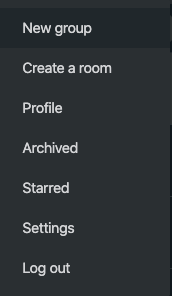
WhatsApp web -> option -> select "Create a room"

Step 2.
Select "Continue with Messenger"

Step 3.
Sign in to Facebook and select "Create Room as"

Step 4.
Once joined : Get the link to be shared on whatsapp.

Step 5.
Adjust the settings as needed.


Through WhatsApp Mobile App:
Step 1.
Method 1. Open WhatsApp, then tap the CALLS tab -> Create a room
Method 2. Open a group chat, then tap Group call -> Create a room
Step 2.
Select "Continue with Messenger" - update the Messenger to be in latest version

Comments
Post a Comment