HomePage Docker
HomePage Docker
DISCLAIMER
- The information provided on this website is intended to provide a basic understanding of certain technologies and is not intended to be a comprehensive guide.
- Therefore, it should not be relied upon as the sole source of information and should not be used as a substitute for professional advice or expert analysis.
- Please exercise caution when visiting or downloading from websites mentioned on this website and verify the safety of the website and software.
- Some websites and software may be flagged as malware by antivirus programs.
- The reader assumes all responsibility for their use of the information contained on this website and any consequences that may arise.
- The author disclaims any liability for any damages or losses that may result from the use of this website or the information contained herein.
- The author reserves the right to update or change the information contained on this website at any time without prior notice.
- Any attempts to perform penetration testing or ethical hacking on systems or networks should be done with the explicit permission of the system/network owner.
- Unauthorized access is illegal and can result in serious legal consequences.
- It is important to fully understand the scope of the testing and to only test within that scope. Testing outside the agreed upon scope is considered unauthorized and may result in legal action.
- Any findings or vulnerabilities discovered during testing should be reported to the system/network owner immediately and kept confidential until a fix can be implemented.
- It is recommended to use a separate, dedicated testing environment rather than testing on a live production system to minimize the risk of accidentally causing damage or downtime.
- It is important to take steps to protect your own identity and prevent accidental data leaks or exposure of sensitive information during testing.
- It is also recommended to follow a standard code of ethics for ethical hacking and penetration testing.
Reference:
- https://gethomepage.dev/
- https://github.com/homarr-labs/dashboard-icons/blob/main/svg/plex.svg
- https://codebeautify.org/yaml-validator
- https://technotim.live/posts/homepage-dashboard/#docker-setup
- https://www.plexopedia.com/plex-media-server/general/plex-token/#plexservertoken
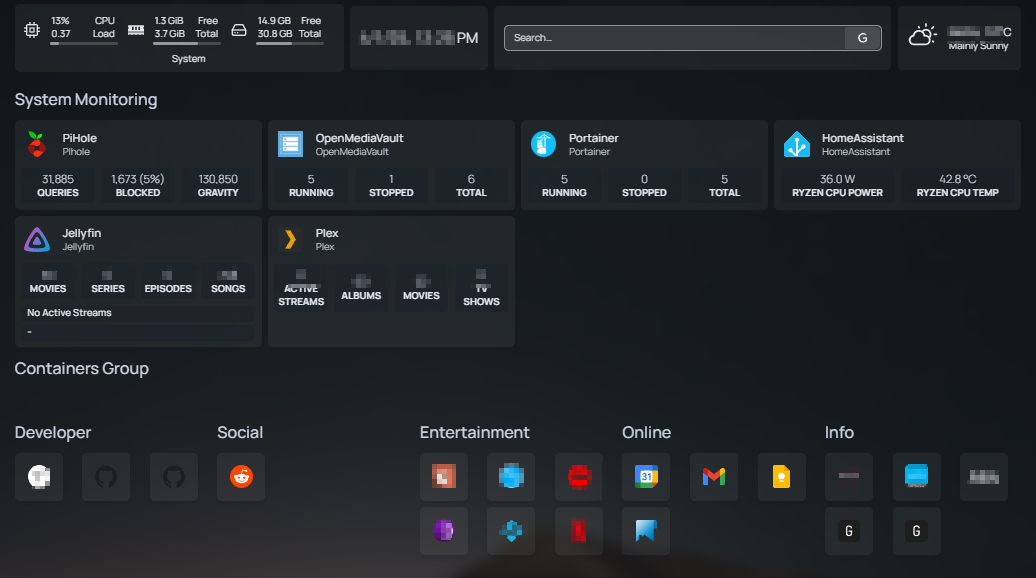 |
| HomePage dashboard |
******************
HomePage Docker Compose File
Errors:
- HOMEPAGE_ALLOWED_HOSTS: Failed host validation
- FIX: Add the server-name and ports under the environment variable : HOMEPAGE_ALLOWED_HOSTS.
- End of the stream or a document separator is expected homepage docker
- FIX: This is a syntax error, like removing anything extra which was added in the file.
- Portainer API Error Unable to find an environment with the specified identifier inside the database
- FIX: passing correct variable names without any miss-match
- "{{HOMEPAGE_VAR_PORTAINER_ACCESS_TOKEN}}" HOMEPAGE_VAR_PORTAINER_ACCESS_TOKEN
- portainer invalid jwt token
- FIX: getting right token from protainer, then stopping container, execute Docker pull command and then Docker up command.
- OMV API Error: Unknown errorURL: https://server-id:90/rpc.php Raw Error:{ "errno": -71,"code": "EPROTO", "syscall": "write"}
- FIX: Mapping right URL with Https://server : port and Http:// server : port
- Plex API Error Unexpected token 'I', "Internal S"... is not valid JSON
- FIX: Mapping right URL with Https://server : port and Http:// server : port
- API Error after adding api key in to ".env" file
- FIX:
- Stop container
- Pull Container
- Start container
************
Files to Modify:
- sudo ls -lah /compose/homepage/
- sudo ls -lah /data/homepage/config/
- sudo nano /compose/homepage/.env
- sudo nano /data/homepage/config/widgets.yaml
- sudo nano /data/homepage/config/settings.yaml
- sudo nano /data/homepage/config/services.yaml
- sudo nano /data/homepage/config/HOMEPAGE_FILE_GETHOMEPAGE
- sudo nano /data/homepage/config/bookmarks.yaml
************
YAML Docker Compose Code:
Things to do right for Docker compose:
- Include".env" environment variable, which will be used to passon the API/username/Passwords in secure ways.
- Add the server-name and ports under the environment variable : HOMEPAGE_ALLOWED_HOSTS.
- This will avoid the error "HOMEPAGE_ALLOWED_HOSTS: Failed host validation"
---
services:
homepage:
image: ghcr.io/gethomepage/homepage:latest
container_name: homepage
ports:
- 3000:3000
volumes:
- /data/homepage/config:/app/config
#- /var/run/docker.sock:/var/run/docker.sock
restart: unless-stopped
env_file:
- .env # use .env
environment:
HOMEPAGE_ALLOWED_HOSTS: HOMEPAGE_FILE_GETHOMEPAGE,192.168.1.15:3000,pi:3000
PUID: 1001
PGID: 100
services:
homepage:
image: ghcr.io/gethomepage/homepage:latest
container_name: homepage
ports:
- 3000:3000
volumes:
- /data/homepage/config:/app/config
#- /var/run/docker.sock:/var/run/docker.sock
restart: unless-stopped
env_file:
- .env # use .env
environment:
HOMEPAGE_ALLOWED_HOSTS: HOMEPAGE_FILE_GETHOMEPAGE,192.168.1.15:3000,pi:3000
PUID: 1001
PGID: 100
******************
 |
| Homepage Dashboard |
Services.yaml
Things to do right for widgets:
- For Portainer widget the environmental value needs to be "env: 2"
---
# For configuration options and examples, please see:
# https://gethomepage.dev/configs/services/
#widgets
- System Monitoring:
- PiHole:
href: http://server-id/admin
icon: pi-hole.svg # icons found here https://github.com/walkxcode/dashboard-icons
description: PIhole
widget:
type: pihole
url: http://server-id
version: 6 # required if running v6 or higher, defaults to 5
key: "{{HOMEPAGE_VAR_PIHOLE_API_KEY}}" # optional, in v6 can be your password or app password
- OpenMediaVault:
href: http://server-id:90
icon: openmediavault.png # icons found here https://github.com/walkxcode/dashboard-icons
description: OpenMediaVault
widget:
type: openmediavault
url: http://server-id:90/
username: "{{HOMEPAGE_VAR_OMV_USER}}"
password: "{{HOMEPAGE_VAR_OMV_PASS}}"
method: services.getStatus # required
- Portainer:
href: http://server-id:9000
icon: portainer.svg # icons found here https://github.com/walkxcode/dashboard-icons
description: Portainer
widget:
type: portainer
url: http://server-id:9000/
env: 2
key: "{{HOMEPAGE_VAR_PORTAINER_ACCESS_TOKEN}}"
- HomeAssistant:
href: http://server-id:8123/
icon: home-assistant.svg # icons found here https://github.com/walkxcode/dashboard-icons
description: HomeAssistant
widget:
type: homeassistant
url: http://server-id:8123
key: "{{HOMEPAGE_VAR_HOMEASSISTANT_ACCESS_TOKEN}}"
custom:
- state: sensor.powers_cpu_package
label: Ryzen CPU Power
- state: sensor.temperatures_cpu_package
label: Ryzen CPU Temp
- Jellyfin:
href: http://server-id:8096
icon: jellyfin.svg # icons found here https://github.com/walkxcode/dashboard-icons
description: Jellyfin
widget:
type: jellyfin
url: http://server-id:8096/
key: "{{HOMEPAGE_VAR_JELLYFIN_API_KEY}}"
enableBlocks: true # optional, defaults to false
enableNowPlaying: true # optional, defaults to true
enableUser: true # optional, defaults to false
showEpisodeNumber: true # optional, defaults to false
expandOneStreamToTwoRows: true # optional, defaults to true
- Plex:
href: https://server-id:32400
icon: plex.svg # icons found here https://github.com/walkxcode/dashboard-icons
description: Plex
widget:
type: plex
url: https://server-id:32400/
key: "{{HOMEPAGE_VAR_PLEX_ACCESS_TOKEN}}" # see https://www.plexopedia.com/plex-media-server/general/plex-token/
fields: ["streams", "movies", "tv", "albums"]
- Containers Group:
# - PI-HOLE Group:
- PI_HOLE Service:
href: http://server-id/admin/
icon: pi-hole.svg # icons found here https://github.com/walkxcode/dashboard-icons
description: PI-Hole page
# - Portiner Group:
- Portainer Service:
href: http://server-id:9000
icon: portainer.svg # icons found here https://github.com/walkxcode/dashboard-icons
description: Portainer Dashboard
# - HomeAssistant Group:
- Homeassistant Service:
href: http://server-id:8123/
icon: home-assistant.svg # icons found here https://github.com/walkxcode/dashboard-icons
description: HomeAssistant Dashboard
# - OpenMediaVault Group:
- OpenMediaVault Service:
href: http://server-id:90/
icon: openmediavault.png # icons found here https://github.com/walkxcode/dashboard-icons
description: OpenMediaVault Dashboard
# - Jellyfin Group:
- Jellyfin Service:
href: http://server-id:8096/
icon: jellyfin.svg # icons found here https://github.com/walkxcode/dashboard-icons
description: Jellyfin Dashboard
# - PLEX Group:
- PLEX Service:
href: https://server-id:32400/
icon: plex.svg # icons found here https://github.com/walkxcode/dashboard-icons
description: PLEX Dashboard
#monitoring
# - SpeedTest Grpoup:
- Speedtest services:
icon: myspeed.svg
href: https://fast.com
description: Network speed tracker
***********************************
Widgets.yaml
---
# For configuration options and examples, please see:
# https://gethomepage.dev/configs/info-widgets/
- resources:
label: System
expanded: true
cpu: true
memory: true
disk:
- /
#uptime: true
#next
- datetime:
test_size: xl
format:
timeStyle: short
dateStyle: short
- search:
provider: [brave, google, duckduckgo]
target: _blank
showSearchSuggestions: true
***************************
Settings.yaml
# For configuration options and examples, please see:
# https://gethomepage.dev/configs/settings/
title: Homepage
headerStyle: boxedWidgets
statusStyle: "dot"
hideVersion: true
useEqualHeights: true
fullWidth: true
#background
background:
image: https://images.unsplash.com/photo-1502790671504-542ad42d5189?auto=format&fit=crop&w=2560&q=80
blur: sm # sm, "", md, xl... see https://tailwindcss.com/docs/backdrop-blur
saturate: 50 # 0, 50, 100... see https://tailwindcss.com/docs/backdrop-saturate
brightness: 50 # 0, 50, 75... see https://tailwindcss.com/docs/backdrop-brightness
opacity: 50 # 0-100
#favicon: https://www.google.com/favicon.ico
cardBlur: md # xs, md, etc... see https://tailwindcss.com/docs/backdrop-blur
#Themes
theme: dark
#color: slate
#layouts
layout:
style: columns
columns: 5
#providers
providers:
openweathermap: openweathermapapikey
weatherapi: weatherapiapikey
************************

Comments
Post a Comment